

Introduction
Microsoft Entra ID (formerly Azure AD) supports both OpenID Connect (OIDC) and SAML 2.0.- For most new deployments, OIDC is recommended as it is simpler to configure and is Microsoft’s preferred modern authentication protocol.
- Use SAML if your organization requires it for policy or compatibility reasons.
ActionType, ReturnURL, and IdentityHandlerConfig fields required for your use case.
This page covers the Entra ID-specific configuration only.
SSO with OpenID Connect
Configure Entra ID
- In the Azure Portal, navigate to Microsoft Entra ID and select App registrations.
- Select New registration. Give the application a name and register it.
- From the app’s Overview page, note the Application (client) ID and Directory (tenant) ID. You will need both for the TIB profile.
-
Navigate to Certificates and secrets and create a new Client secret. Copy the secret Value (not the Secret ID) immediately as it will not be shown again.

-
Navigate to Authentication and add a Redirect URI of type Web. Set it to:
Replace
{tib-host}with the hostname of your TIB instance and{profile-id}with the ID you will assign to the TIB profile.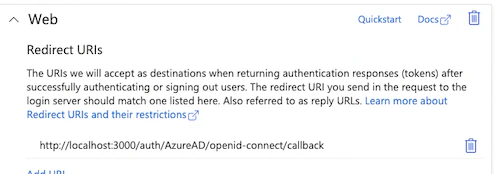
TIB Profile
The Entra ID-specific configuration goes in theProviderConfig block of the TIB profile. Set ProviderName to SocialProvider and Type to redirect.
ProviderConfig fields are:
| Field | Description |
|---|---|
CallbackBaseURL | The base URL of your TIB instance. TIB appends the callback path automatically. |
FailureRedirect | URL to redirect the user to on authentication failure. |
UseProviders.Name | Must be openid-connect. This value routes TIB to the OpenID Connect provider implementation. |
UseProviders.Key | The Entra ID Application (client) ID. |
UseProviders.Secret | The Entra ID client secret value. |
UseProviders.Scopes | OAuth scopes to request. openid and email are required. |
UseProviders.DiscoverURL | The Entra ID OIDC discovery URL for your tenant. |
JSON Web Encryption (JWE)
If Entra ID is configured to encrypt ID tokens, TIB can decrypt them using JWE. Add aJWE block to ProviderConfig to enable this:
PrivateKeyLocation to the certificate ID from the Tyk Dashboard certificate manager. For standalone TIB, set it to the file path of a PEM file containing the private key. The key must correspond to the public key registered with Entra ID for token encryption.
Requires Tyk Identity Broker v1.6.1+ and Tyk Dashboard v5.7.0+.
Worked Examples (OIDC)
These examples use embedded TIB, so theCallbackBaseURL is the same as the Dashboard or Portal respectively; TIB handles requests on the same host and port.
- Dashboard SSO
- Portal SSO
In this example, Tyk Dashboard is running at With this configuration, registered users (with a Tyk Dashboard user account) get their own permissions; unregistered users fall back to the group specified in Login URLThis URL initiates the SSO login flow:In production, present this as a “Log in with Entra ID” button or link on a custom login page, rather than expecting users to navigate to it directly.See Dashboard SSO for details on session behavior, permissions, and user group mapping.
http://dashboard.example.com on port 3000; replace the example values with your own.Tyk Dashboard configurationsso_default_group_id. See Dashboard SSO for full details.TIB profileThe TIB profile is created via the Tyk Identity Broker API or the Tyk Dashboard UI.- set
Keyto the Entra ID Application (client) ID - set
Secretto the Entra ID client secret Value - set
DashboardCredentialto the TIB service account’s Dashboard credentials
ID in the registered URL must exactly match the ID in your TIB profile; a mismatch will result in a 400 Bad Request error:SSO with SAML
Configure Entra ID
- In the Azure Portal, navigate to Microsoft Entra ID and select Enterprise applications.
- Select New application and then Create your own application. Give it a name and select Integrate any other application you don’t find in the gallery.
- Navigate to Single sign-on and select SAML.
- TIB exposes a SAML Service Provider (SP) metadata endpoint for each profile. For embedded TIB, this is on the same host as the Tyk Dashboard (or Developer Portal), for example:
You can use this URL to configure Entra ID automatically, or manually set the Entity ID and Reply URL (ACS URL). The ACS URL is:
- From the SAML Certificates section, copy the App Federation Metadata URL. You will need this for the TIB profile
IDPMetadataURLfield. - Under Attributes and Claims, ensure the email claim is mapped. By default Entra ID maps email to
http://schemas.xmlsoap.org/ws/2005/05/identity/claims/emailaddress.
TIB Profile
The Entra ID-specific configuration goes in theProviderConfig block of the TIB profile. Set ProviderName to SAMLProvider and Type to redirect.
ProviderConfig fields are:
| Field | Description |
|---|---|
SAMLBaseURL | The base URL of your TIB instance. Used to construct the SP metadata and ACS URLs. |
IDPMetadataURL | The Entra ID federation metadata URL for your tenant. |
CertLocation | Path to a PEM file containing the SP certificate and private key concatenated. When using Tyk Dashboard with embedded TIB, this can be a certificate ID from the Tyk Certificate Store. |
SAMLEmailClaim | The SAML claim name for the user’s email address. |
SAMLForenameClaim | The SAML claim name for the user’s first name. |
SAMLSurnameClaim | The SAML claim name for the user’s last name. |
ForceAuthentication | Set to true to force Entra ID to re-authenticate the user on every request, ignoring any existing session. |
Worked Examples (SAML)
These examples use embedded TIB, soSAMLBaseURL is the same as the Dashboard or Portal respectively. TIB handles requests on the same host and port.
- Dashboard SSO
- Portal SSO
In this example, Tyk Dashboard is running at With this configuration, registered users (with a Tyk Dashboard user account) get their own permissions; unregistered users fall back to the group specified in In production, present this as a “Log in with Entra ID” button or link on a custom login page, rather than expecting users to navigate to it directly.See Dashboard SSO for details on session behavior, permissions, and user group mapping.
http://dashboard.example.com on port 3000; replace the example values with your own.Tyk Dashboard configurationsso_default_group_id. See Dashboard SSO for full details.CertificateUpload the Service Provider certificate pair that will be used to sign SAML requests to the Tyk Certificate Store (API Security > TLS/SSL Certificates), noting the assigned certificate ID to be used in the TIB profile.TIB profileThe TIB profile is created via the Tyk Identity Broker API or the Tyk Dashboard UI.- set
DashboardCredentialto the TIB service account’s Dashboard credentials - set
CertLocationto the certificate ID for the SAML SP certificate
ADFS (On-Premises)
Active Directory Federation Services (ADFS) is Microsoft’s on-premises federation service. It uses the same SAML 2.0 protocol as Entra ID. Follow the SSO with SAML instructions above, with the following differences: Configure ADFS (replaces “Configure Entra ID”) Instead of configuring an Enterprise Application in the Azure Portal, configure a Relying Party Trust in the ADFS management console. Provide the TIB SP metadata URL to configure the trust automatically:IDPMetadataURL- use the ADFS federation metadata endpoint instead:SAMLEmailClaim,SAMLForenameClaim,SAMLSurnameClaim- ADFS claim URIs depend on your claim issuance policy and may differ from the Entra ID defaults. Check the claims configured in your ADFS Relying Party Trust and update these values accordingly.